


What is a UTM Builder?
A UTM Builder is a tool that helps you generate URLs with UTM parameters — tags appended to a link so analytics platforms (like Google Analytics) can track where a visitor came from and which campaign or channel they interacted with. UTM stands for Urchin Tracking Module, a format used universally for campaign attribution.
With a UTM Builder, you simply fill in your campaign details and it automatically produces a properly formatted tracking URL — saving time and preventing errors that can corrupt analytics data.
UTM Parameters — The Building Blocks
A UTM‑tagged URL uses up to five standard parameters:
| UTM Parameter | Required | Purpose | Example |
|---|---|---|---|
| utm_source | ✔ | Identifies traffic source, such as website or platform | facebook, newsletter |
| utm_medium | ✔ | Identifies the type of marketing channel | email, cpc, social |
| utm_campaign | ✔ | Names the specific campaign or promotion | spring_sale_2026 |
| utm_content | ✦ | Differentiates similar links (e.g., A/B test) | header_cta, footer_button |
| utm_term | ✦ | Tracks keywords for paid search campaigns | running+shoes |
(✦ Optional parameters are useful for deeper segmentation but aren’t required for basic campaign tracking.)
🛠️ How to Create UTM Links (Step‑by‑Step)
1️⃣ Choose the Base URL
Start with the destination URL you want people to land on.
Example:
https://yourwebsite.com/landing-pageThis will be the foundation of your trackable URL.
2️⃣ Open a UTM Builder Tool
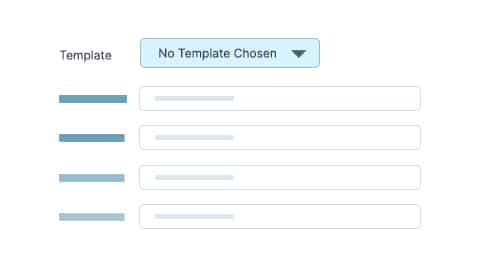
Use Template Parameters to generate your tracking URL automatically.
A typical UTM builder will have fields like:
- Website URL
- UTM Source
- UTM Medium
- UTM Campaign
- (Optional) UTM Content
- (Optional) UTM Term
Fill in these fields with the appropriate values for your marketing campaign.
3️⃣ Fill in the Campaign Details
Here’s what you’ll typically enter in each field:
- Website URL – Your landing page address.
- UTM Source – Where the click is coming from (e.g.,
facebook,email). - UTM Medium – The channel type (e.g.,
social,cpc,email). - UTM Campaign – Campaign name or identifier (e.g.,
summer_launch). - UTM Content (optional) – For tracking different creatives or placements.
- UTM Term (optional) – Often used for paid search keyword tracking.
4️⃣ Generate & Copy the URL
Once all values are entered, click the “Generate” or “Create URL” button in the UTM builder. The tool will create a URL that looks like this:
https://yourwebsite.com/landing-page?utm_source=facebook&utm_medium=social&utm_campaign=summer_launch&utm_content=cta_buttonCopy the generated UTM URL. You’re now ready to use it in your marketing assets.
Using the UTM Link in Campaigns
Deploy your newly generated UTM link wherever you’re running campaigns:
✔ Social media posts
✔ Email newsletters
✔ Paid ads
✔ QR codes on print material
When someone clicks the tagged link, analytics tools will record the source, medium, and campaign automatically — giving you clear data on campaign performance.
Why Using a UTM Builder Matters
Manually appending UTM parameters can be error‑prone. A UTM Builder ensures:
✅ Proper parameter formatting
✅ Fewer typos and mistakes
✅ Consistent tracking across campaigns
✅ Analytics tools correctly attribute session data to the right campaign.

.png)